
Last verified: November 2026
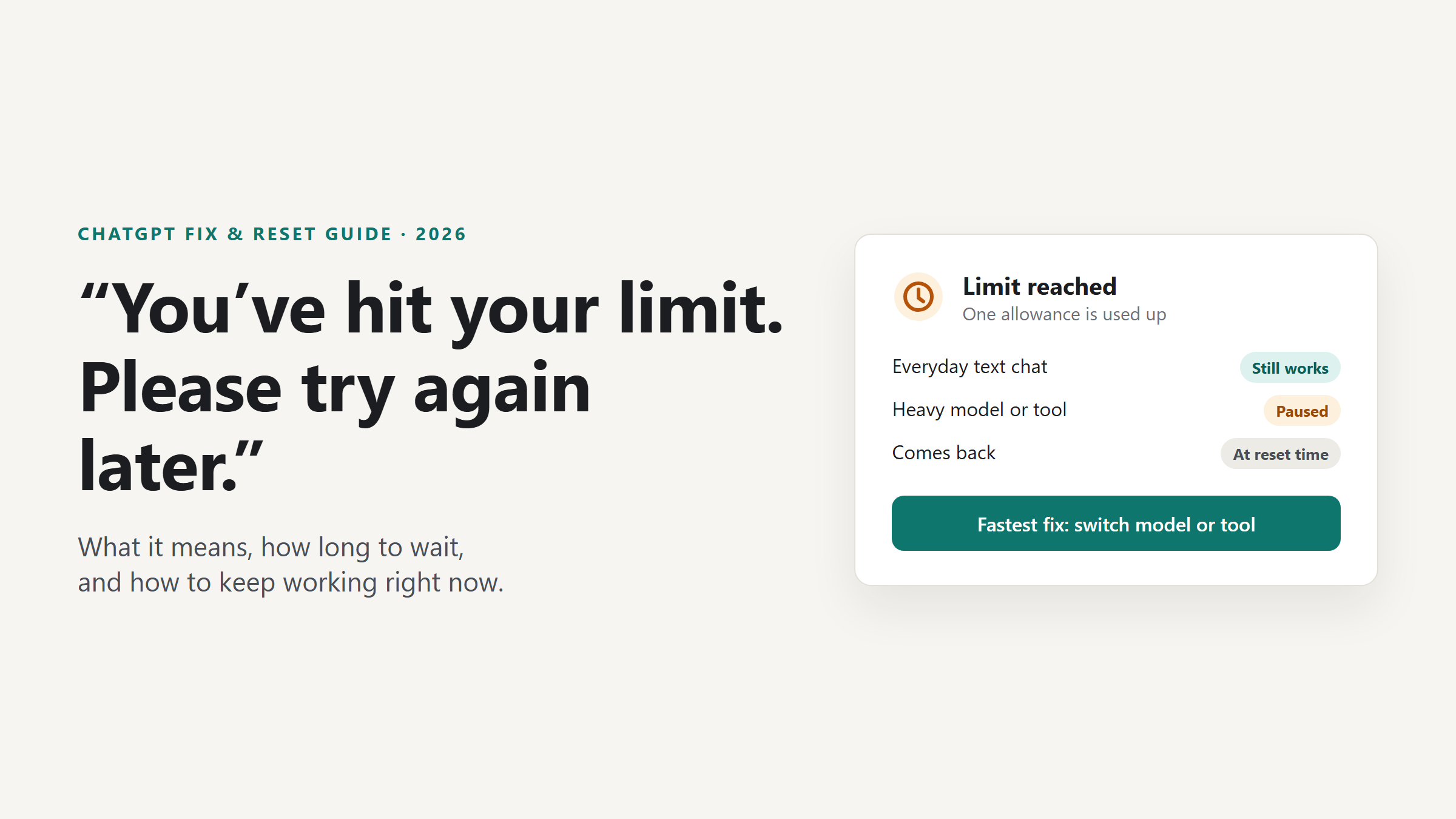
Quick answer: “You’ve hit your limit. Please try again later” means you used up one ChatGPT allowance, such as Thinking, a Pro model, uploads, images or voice. ChatGPT shows the reset time when it can. The fastest fix is to switch to another available model or tool and keep working.
Fix it now:
- Switch to a different model or thinking level in the model menu (everyday text chat is unlimited on every plan).
- Look for the reset time ChatGPT shows, then come back after it.
- Start a new chat with a short summary if the thread is very long.
- Check status.openai.com to rule out an outage.
- Update the app or reload the page if the message appears when you’ve barely used ChatGPT.
Table of contents
- What the message actually means
- Why ChatGPT says you’ve hit your limit
- How long you have to wait
- How to fix it, step by step
- Fixes by platform: Android, iPhone, web, desktop
- GPT-6 and “ChatGPT 5” limits
- “I pay for Plus or Pro and still hit the limit”
- Feature-specific limits
- API users: 429 errors
- The same message on Claude
- What not to do
- How to avoid the limit next time
- FAQ
What “You’ve hit your limit. Please try again later” actually means
The message means ChatGPT has stopped one specific thing you were trying to do until an allowance resets. It does not mean your account is banned, and it does not mean your subscription changed. OpenAI says so directly: a usage limit “does not end your subscription or mean your account is restricted.”
One thing changed in 2026 that most older answers miss. Everyday text chat is now unlimited on Free, Go, Plus and Pro, subject to abuse-prevention guardrails. So if you see “you’ve hit your limit” today, you almost always ran out of something more specific:
- a Thinking allowance (Medium, High or Extra High),
- a Pro model allowance (GPT-6 Pro or GPT-5.6 Sol Pro),
- a tool allowance (file uploads, image generation, voice, data analysis, deep research),
- your ChatGPT Work and Codex allowance (agent tasks and coding),
- or a short abuse-prevention restriction.
Sometimes the message isn’t a limit at all. A stale session or an outage can show a similar error. That’s why the first step is figuring out which one you have.
Why OpenAI uses limits
The newest models and tools cost far more computing power per reply than a quick text answer. Allowances keep heavy features available for everyone, stop automated abuse, and smooth out demand spikes. That’s why the expensive features have caps and plain chat doesn’t.
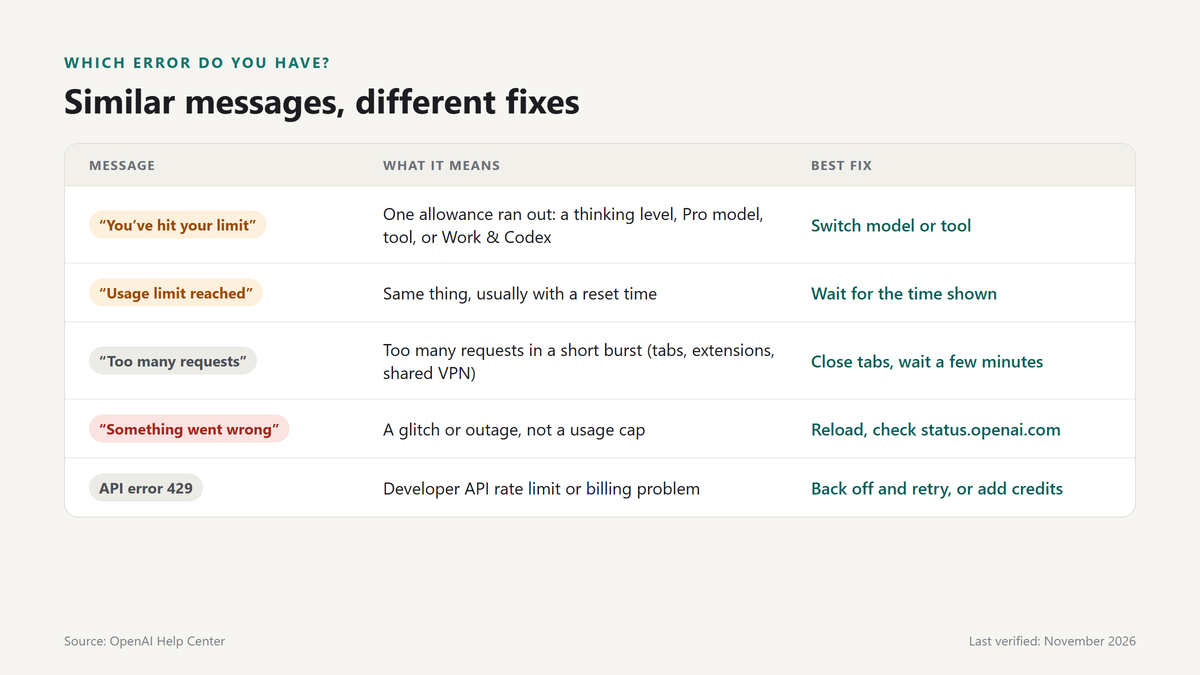
Similar messages and what each one means
| Message you see | What it usually means | Best fix |
|---|---|---|
| “You’ve hit your limit. Please try again later” | One allowance (model, thinking level, tool or Work/Codex) is used up | Switch model or tool; wait for the reset time shown |
| “You’ve reached your usage limit” / “usage limit reached” | Same as above, often with a reset time | Same as above; check Settings → Usage on paid plans |
| A model shows as temporarily unavailable | That model’s own allowance ran out (common with Pro models) | Pick another model; it returns at reset |
| “Too many requests” / “Too many requests in 1 hour” | Too many requests in a short burst, sometimes from many tabs or automation | Close extra tabs, stop extensions, wait a few minutes |
| “Something went wrong” / “There was an error generating a response” | A glitch or outage, not a usage cap | Retry, reload, check status.openai.com |
| A notice that usage was temporarily restricted | OpenAI’s misuse safeguards triggered | Wait; contact Support if you think it’s wrong |
API error 429 rate_limit_exceeded / insufficient_quota | Developer API limit or billing problem, not ChatGPT | See the API section |
Why ChatGPT says you’ve hit your limit (all causes)
Heavy use of thinking levels. Choosing Medium, High or Extra High uses GPT-6 Sol (or GPT-5.6 Sol if you picked it). These levels have plan-based limits. When you reach one, OpenAI says ChatGPT “may continue with another available model.”
Pro models. GPT-6 Pro and GPT-5.6 Sol Pro have their own allowances, including a weekly GPT-6 Pro message limit. A Pro subscription “does not include unlimited use of the GPT-6 Pro model,” according to OpenAI.
Long threads and big uploads. Every reply re-reads your earlier messages, files and tool results. A huge thread uses more of a metered allowance per reply than a short one, so you hit Work, Codex or thinking limits sooner.
File uploads. Uploads have their own limit, which is tight on Free (“limited” on the pricing page) and higher on paid plans.
Image generation. Images have separate limits on every plan. Pro is listed as unlimited, subject to guardrails. In Work and Codex, image generation uses your allowance about 3–5 times faster than a similar turn without an image.
Deep research. Deep research is “limited” on Free and Go and expanded on Plus and Pro. Each run is a long task, so it runs out faster than you’d expect.
Voice. Voice has a daily allowance. Voice used inside Work draws minutes from that same daily allowance.
Agent work and Codex. ChatGPT Work and Codex share one allowance. On Plus, that allowance runs in five-hour periods with weekly limits on top.
Many tabs, devices or automation. Several sessions firing requests at once, or a browser extension that calls ChatGPT in the background, can trip burst protection. That’s the “too many requests” family of errors.
Shared IP or VPN. Many users behind one VPN exit address can look like automated traffic. It’s rarer than forums suggest, but it happens.
Misuse safeguards. Sharing account credentials, reselling access and automated data extraction break OpenAI’s terms. Even unusual patterns that only look like those can trigger a “temporary usage restriction.” ChatGPT tells you when this happens.
How long do you have to wait? Reset times explained
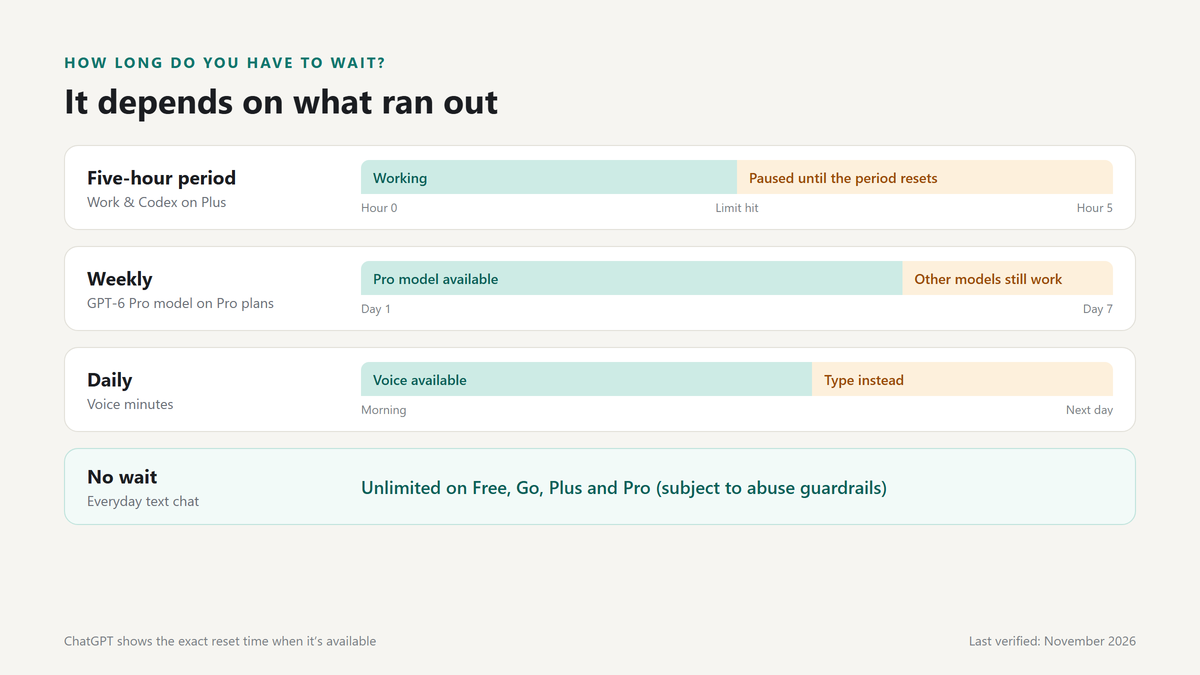
OpenAI uses three kinds of windows. Which one applies depends on what you ran out of.
- Five-hour periods apply to ChatGPT Work and Codex on Plus and Standard Business. OpenAI’s Codex pricing page says “Pro plans currently have no five-hour limit.”
- Weekly limits apply to the GPT-6 Pro model on Pro plans, and may also apply to Work and Codex.
- Daily allowances apply to some features, such as voice.
A simple example. You’re on Plus and start a Codex task at 9:00 a.m. You use up the five-hour allowance by 11:30 a.m. Coding stops until the period resets. Regular Chat still works the whole time, because everyday text chat isn’t capped.
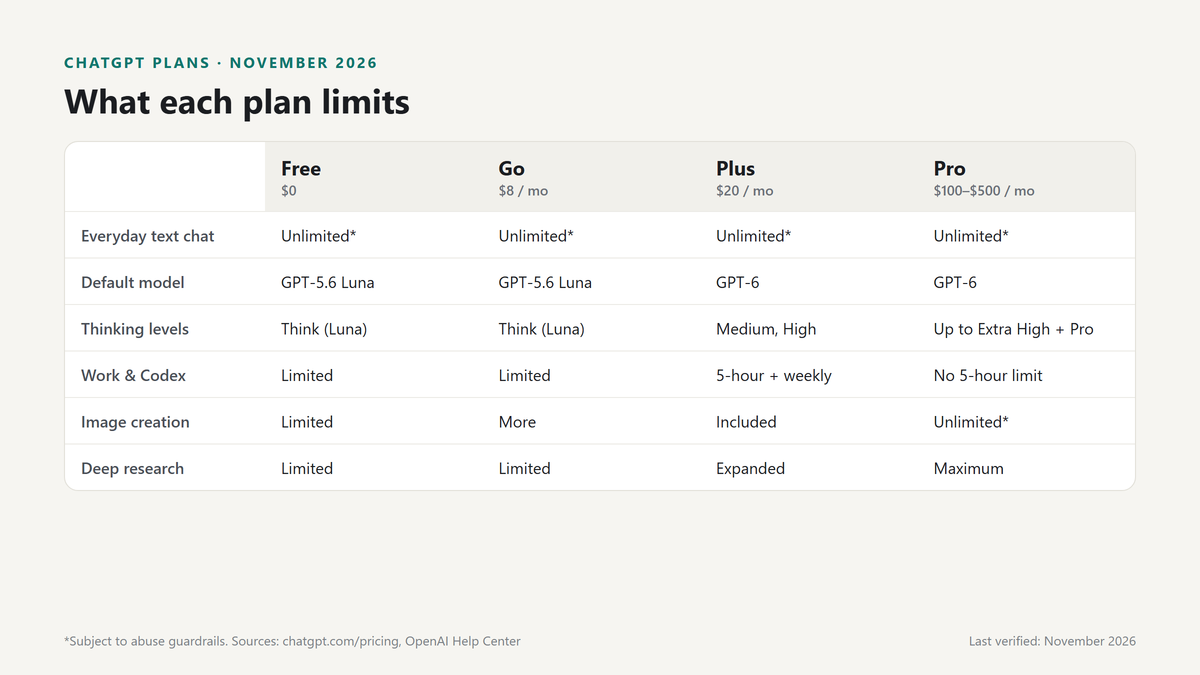
Limits by plan (verified November 10, 2026)
OpenAI publishes few hard numbers for Chat. Where it doesn’t, the table says so instead of guessing.
| Plan (price) | Everyday text chat | Thinking / Pro models | Images | Deep research | Work & Codex |
|---|---|---|---|---|---|
| Free ($0) | Unlimited* (GPT-5.6 Luna) | “Think” uses GPT-5.6 Luna; no GPT-5.6 Sol | Limited | Limited | Limited (desktop app) |
| Go ($8/mo) | Unlimited* (GPT-5.6 Luna) | “Think” uses GPT-5.6 Luna; no GPT-5.6 Sol | More than Free | Limited | Limited (desktop app) |
| Plus ($20/mo) | Unlimited* | Medium and High included; plan limits apply | Included, with limits | Expanded | Five-hour periods; weekly limits may apply |
| Pro ($100 / $200 / $500 per mo) | Unlimited* | Extra High and Pro included; weekly GPT-6 Pro limit | Unlimited* | Maximum | No five-hour limit; larger allowance by tier |
| Business (per seat) | See OpenAI | Medium, High, Extra High and Pro included | See OpenAI | See OpenAI | Five-hour periods on Standard seats |
| Enterprise / Edu (custom) | See OpenAI | Included; depends on workspace settings | See OpenAI | See OpenAI | Plus-level limits, or credit-based with flexible pricing |
*Subject to abuse guardrails. OpenAI’s footnote: “Usage must be reasonable and comply with our policies.”
How to see when access comes back
- In the message itself. ChatGPT “displays when an allowance resets when that information is available.” Look for a time in the banner or under the model name.
- Settings → Usage. On paid plans you can view credit balances and buy credits there.
- Codex. Open the usage dashboard, or type
/statusin the Codex CLI to see what’s left.
If access hasn’t returned after the time shown, that’s the moment to contact Support. Before that, they can’t help, because OpenAI Support “does not reset ChatGPT or Codex usage limits.”
How to fix “You’ve hit your limit” step by step
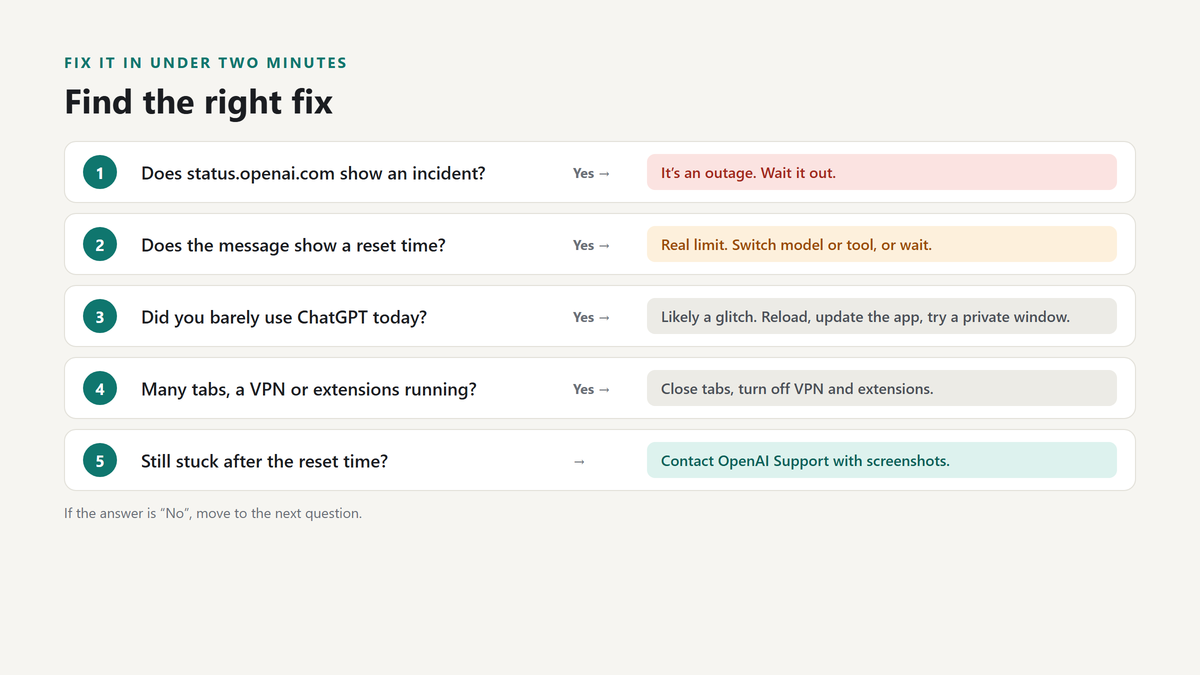
Each fix is labeled with what it works for. Real cap means an allowance ran out. Glitch means a stale session or app bug. Outage means OpenAI has a problem.
a. Switch to an available model or thinking level
Works for: real cap
- Open the model menu at the top of the chat (web and desktop) or near the top of the screen (mobile).
- If you were on High, Extra High or Pro, slide the Thinking control down to Instant or Medium.
- If you were using GPT-6 Pro, try GPT-5.6 Sol with Pro, if your plan’s daily allowance for it has room.
- Resend your message.
On Pro $200, ChatGPT does part of this for you: when you reach the weekly GPT-6 Pro limit, it “automatically switches to GPT-5.6 Thinking at Medium.” On Pro $100, both Pro models share one weekly allowance, so switching between them won’t help.
b. Wait for the reset, and keep track of it
Works for: real cap
- Note the reset time ChatGPT shows.
- Keep working in plain Chat in the meantime. It isn’t capped.
- Set a phone reminder for the reset time if you need the heavy feature back.
c. Start a new chat and carry the context over
Works for: real cap (makes each reply cheaper) and length problems
Long threads make every reply more expensive. Paste this into your old chat before you leave it:
Summarize this conversation so I can continue it in a new chat.
Include: my goal, key facts and decisions so far, any numbers or code
we settled on, open questions, and the next step. Keep it under 250 words.
Then open a new chat and paste the summary as your first message.
d. Shorten prompts and uploads
Works for: real cap
- Upload only the pages or columns you need, not the whole file.
- Ask for the output you want (“a 5-row table”) instead of an open-ended answer.
- Turn off tools a chat doesn’t need.
e. Close extra tabs and sessions
Works for: glitch, burst limits
- Close duplicate ChatGPT tabs.
- Stop any browser extension or script that sends prompts for you.
- Sign out of devices you aren’t using.
f. Turn off your VPN or proxy
Works for: burst limits on shared IPs (sometimes)
Disconnect the VPN, or switch from public Wi-Fi to mobile data, then reload. If the error stops, the shared address was the problem. If it doesn’t, this wasn’t your issue.
g. Clear cache and cookies, or try a private window
Works for: glitch only
This fixes a stuck session. It does not reset a real allowance, because limits are tied to your account, not your browser. Open a private window and sign in. If ChatGPT works there, clear the site data in your normal browser.
h. Check OpenAI’s status page
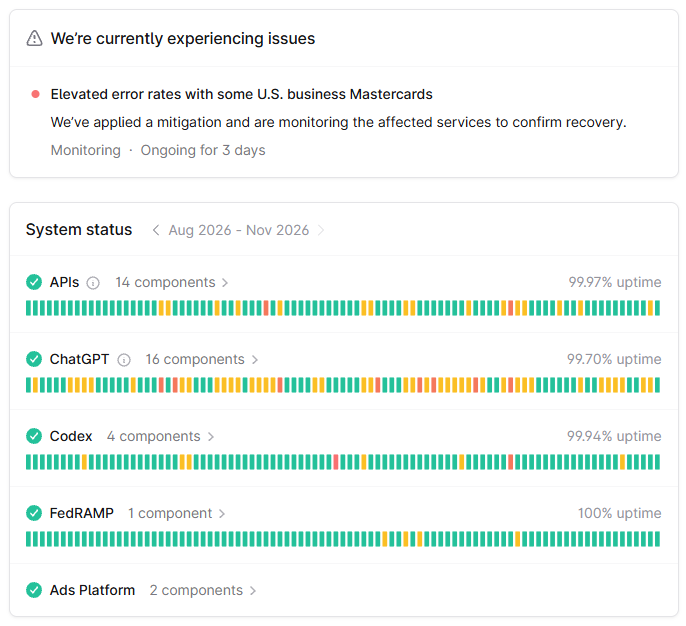
Works for: outage
Visit status.openai.com. If ChatGPT or a specific feature shows an incident, nothing on your side will fix it. Wait it out.
i. Update or reinstall the app
Works for: glitch
Old app versions can show wrong availability. In the ChatGPT desktop app, open Menu → Check for Updates. OpenAI recommends checking manually even if the app recently auto-updated. On phones, update ChatGPT from the App Store or Google Play.
j. Upgrade your plan, or buy credits
Works for: real cap
- Free → Go ($8): more uploads, images, voice and memory.
- Go → Plus ($20): GPT-6 with Medium and High thinking, expanded deep research, Work and Codex on web and mobile.
- Plus → Pro ($100, $200 or $500): Extra High and Pro thinking, GPT-6 Pro, no five-hour limit in Work and Codex.
- Credits: Plus and Pro users can buy credits for Work, Codex, and ChatGPT for Word, Excel and PowerPoint. Credits “do not provide additional usage for every ChatGPT model or feature,” so check what you need first.
k. Contact OpenAI Support
Works for: miscounted usage, access not returning, wrongful restriction
Use the chat bubble at help.openai.com while signed in. Include your plan, the exact message, the feature or model you were using, the reset time shown, and screenshots. Support can’t lift a working limit early, but it can investigate wrong counts or restrictions.
Fixes by platform
Most limits are tied to your account, so switching devices won’t get around a real cap. Platform fixes help when the message is a glitch.
“You’ve hit your limit” on Android
- Update ChatGPT in Google Play.
- Force-stop the app (Settings → Apps → ChatGPT → Force stop), then reopen it.
- If it keeps happening, clear the app’s cache (not its data) in the same menu.
- Turn off battery optimization for ChatGPT if replies stall in the background.
“You’ve hit your limit” on iPhone and iOS
- Update ChatGPT in the App Store.
- Swipe the app away and reopen it.
- Toggle between Wi-Fi and mobile data.
- If you subscribed through Apple, confirm the plan is active under your Apple ID’s subscriptions. A lapsed payment can make paid features disappear.
Web browser
- Hard-reload the page (Ctrl+Shift+R on Windows, Cmd+Shift+R on Mac).
- Try a private window, then clear chatgpt.com site data if that works.
- Disable extensions that touch ChatGPT.
Windows and Mac desktop app
- Menu → Check for Updates, then restart the app.
- Note that older ChatGPT desktop apps don’t support some GPT-6 features. OpenAI suggests using the web if your version is behind.
GPT-6, GPT-5.6 and “ChatGPT 5” limits
Many people still search for “ChatGPT 5.” As of November 2026, the default for eligible paid users is GPT-6, rolling out on Plus, Pro, Business and Enterprise. In the model menu, GPT-6 replaces “Latest.” Free and Go users get GPT-5.6 Luna. The GPT-5.6 family (Sol, Sol Pro, Terra, Luna) is still available, and older selectable models aren’t being retired by this rollout.
The newest and most capable options hit limits first because they cost the most to run. Here’s how to pick:
- Instant: quick answers, rewriting, everyday questions. No meaningful cap.
- Medium: most real work. Plenty of headroom on Plus.
- High / Extra High: hard reasoning, long analysis. Save these for when Medium falls short.
- Pro (GPT-6 Pro, powered by GPT-6 Astra): the hardest problems. Weekly limits apply.
When you reach a Thinking limit, ChatGPT may move you to another available model. That’s the “fallback” people notice when answers suddenly feel lighter.
Also Check: Why is chatgpt so slow
“I pay for Plus or Pro and still hit the limit”: why
Paying raises your allowances. It doesn’t remove them all.
- Plus has limits on Thinking, and five-hour and weekly periods for Work and Codex. OpenAI’s estimate for Plus is 15–160 local Codex messages per five hours with GPT-6.1 Sol, depending on the task.
- Pro says “unlimited subject to abuse guardrails” for many features, but the GPT-6 Pro model has a weekly message limit, and Work and Codex have a set allowance by tier.
- Speed modes cost more. Fast mode uses your allowance at 2.5 times the Standard rate. Ultrafast (Pro $500 only) uses it at 8 times.
- Similar tasks can cost different amounts. OpenAI says usage depends on the model, context, reasoning, tool use, retrieval, caching and speed.
- Account sharing gets flagged. Sharing credentials and reselling access are banned and can lead to restrictions.
What to do: check which model or feature hit the limit, drop the speed mode to Standard, and use credits for Work and Codex if you can’t wait. If you think the count is wrong, contact Support with screenshots.
Feature-specific limits
| Feature | Free | Go | Plus | Pro | Tip |
|---|---|---|---|---|---|
| File uploads | Limited | More | Expanded | Yes | Upload excerpts, not whole files |
| Image generation | Limited | More | Yes | Unlimited* | Fix the prompt in text before generating |
| Deep research | Limited | Limited | Expanded | Maximum | Write a precise brief first |
| Voice | Limited | Expanded | Expanded | Unlimited* | Daily allowance; Work voice uses the same minutes |
| ChatGPT Work (agent) | Limited (desktop) | Limited (desktop) | Desktop, web, mobile | Longer sessions | Shares one allowance with Codex |
| Codex | Limited | Limited | Expanded | Expanded | Check /status in the CLI |
*Subject to abuse guardrails. Source: chatgpt.com/pricing and OpenAI Help Center, verified November 10, 2026.
API users: 429 errors, rate limits and quota
If you build with the OpenAI API, you won’t see “You’ve hit your limit” in ChatGPT’s wording. You’ll get HTTP 429. Your ChatGPT subscription and API billing are separate. Paying for Plus or Pro doesn’t raise your API limits, except for Pro’s monthly API credits.
Two very different problems share that status code:
rate_limit_exceeded: you sent too many requests or tokens too fast for your usage tier. Wait and retry.insufficient_quota: a billing problem. Retrying won’t help. More specific codes includecredit_balance_exhausted(add prepaid credits) andorganization_usage_limit_exceeded(request a higher limit).
Limits are measured in requests per minute (RPM) and tokens per minute (TPM). They rise as your usage tier goes up, and you can see them on the Limits page in your API settings. For big non-urgent jobs, the Batch API has its own, higher limits.
Retry rate-limit errors with exponential backoff and jitter, and stop immediately on quota errors:
import random
import time

from openai import OpenAI, RateLimitError

client = OpenAI()


def create_with_backoff(max_retries: int = 6, **kwargs):
    delay = 1.0
    for _ in range(max_retries):
        try:
            return client.responses.create(**kwargs)
        except RateLimitError as err:
            if err.code == "insufficient_quota":
                raise  # billing problem: retrying won't help
            time.sleep(delay + random.uniform(0, delay))
            delay = min(delay * 2, 60)
    raise RuntimeError("Still rate limited after retries")


response = create_with_backoff(model="gpt-5.6-luna", input="Hello")
“You’ve hit your limit” on Claude: how it differs
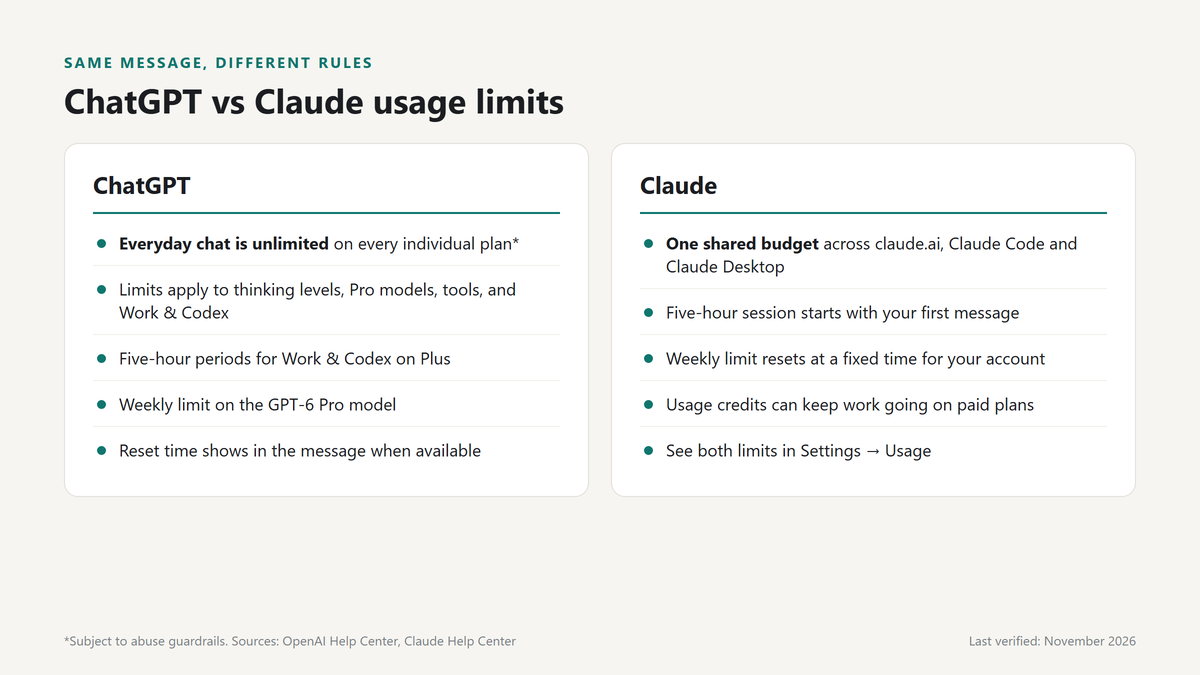
Claude, made by Anthropic, uses usage limits too, but they work in a more predictable way.
Two limits on paid plans. Pro, Max, Ultra, Team and seat-based Enterprise plans have a session limit that resets every five hours and weekly limits that reset once a week. Some plans also have a separate weekly limit for Claude’s Fable model.
When the clock starts. The five-hour period starts with your first message, and your allowance “resets in full five hours later.” The weekly reset is at a fixed day and time assigned to your account. It doesn’t move based on when you start using Claude.
Everything shares one budget. Claude.ai, Claude Code and Claude Desktop all count toward the same limit.
How to see your reset time. Open Settings → Usage. “Current session” shows what you’ve used and the time remaining. The next weekly reset is listed there too.
What uses it up faster. Long conversations, big files, connected tools, web search, higher effort levels and the most capable models all use more of your allowance.
How to fix it:
- Wait for the reset shown in Settings → Usage.
- Start a new conversation if the current one is very long.
- Lower the effort level, or turn thinking off where the model allows it.
- Turn off connectors and web search you don’t need.
- Turn on usage credits (paid plans), so work continues on credits instead of stopping.
- Upgrade. Max offers 5x or 20x Pro’s usage, and verified Ultra accounts have no five-hour limit. A new plan’s limits apply right away.
Key difference from ChatGPT: ChatGPT now leaves everyday chat uncapped and limits specific models and tools. Claude counts all your use against one session-and-week budget.
What NOT to do: myths and risky “bypasses”
- Making several free accounts to dodge limits. It breaks the spirit of OpenAI’s terms, splits your chat history, and can get accounts restricted.
- Sharing one paid login. OpenAI names “sharing account credentials” as prohibited and may restrict access for it. Simultaneous use from different places is also an easy way to trip abuse safeguards.
- “Unlimited ChatGPT” sites and apps. Third-party wrappers may log everything you type, resell your data, or charge for access they don’t deliver. Some are plain scams. Never sign in to them with your OpenAI password.
- Browser hacks and “reset” scripts. Limits live on OpenAI’s servers. No cookie trick, user-agent change or extension resets them.
- Spamming retry. Hammering the send button after a “too many requests” error only extends the cooldown.
OpenAI states it plainly: “You cannot bypass a limit or increase it through a setting.”
How to avoid hitting the limit again
- Keep Instant or Medium as your default. Move to High or Pro only for hard problems.
- Group related questions into one message instead of sending five short ones.
- Summarize and restart long threads every few dozen turns.
- Upload excerpts, not 200-page PDFs, when you only need one section.
- Use Projects to keep reference files in one place instead of re-uploading them.
- Draft image prompts in plain chat first, then generate once.
- Write a clear brief before starting deep research or a Work task.
- Use Standard speed unless you truly need Fast or Ultrafast.
- In Codex, pick a smaller model for routine edits and check
/statusregularly. - Turn off tools and connectors a chat doesn’t need.
- Note your reset times so you can schedule heavy work right after them.
- Close extra tabs and switch off automation extensions.
FAQ
Why is ChatGPT saying I’ve hit my limit?
You used up one specific allowance, usually a thinking level, a Pro model, file uploads, image generation, voice, deep research, or your Work and Codex allowance. Everyday text chat is unlimited on all individual plans in 2026, so the limit almost always applies to a heavier feature, not to chatting itself.
What does “hit your limit” mean in ChatGPT?
It means a usage allowance ran out for a while. It’s not a ban and it doesn’t change your plan. OpenAI says a usage limit doesn’t mean your account is restricted. You can keep using other available models and tools, and the limited one returns at its reset time.
How do I fix the ChatGPT limit?
Switch to another model or a lower thinking level, then resend your message. If you need the limited feature, wait for the reset time ChatGPT shows. For glitches, reload, update the app or try a private window. Plus and Pro users can also buy credits for Work and Codex.
How long do you have to wait to use ChatGPT again?
It depends on what ran out. Work and Codex on Plus reset in five-hour periods, the GPT-6 Pro model has a weekly limit, and voice has a daily allowance. Everyday chat usually doesn’t need any wait. ChatGPT shows the exact reset time when it’s available.
Does clearing cookies reset the limit?
No. Limits are tied to your account on OpenAI’s servers, not your browser. Clearing cookies or using a private window only fixes stuck sessions that show a false error. If the limit is real, it will still be there after you sign back in.
Does a VPN cause “you’ve hit your limit”?
Sometimes. A VPN exit address shared by many users can trigger burst protection that looks like a limit. If the error appears right after connecting to a VPN, disconnect and reload. A real usage cap won’t change when you switch networks.
Is the limit per account or per device?
Per account. Your allowances follow you across web, desktop, Android and iPhone. Signing in on another device won’t give you a fresh allowance. On Claude, usage on claude.ai, Claude Code and Claude Desktop also counts toward one shared limit.
Do limits differ on mobile?
No. The same plan limits apply on every platform. What can differ is app behavior: an outdated app may show a model as unavailable or hide new features. Update ChatGPT from the App Store or Google Play if mobile behaves differently from the web.
Does ChatGPT Pro have unlimited use?
Not completely. Pro offers many features as “unlimited subject to abuse guardrails,” but the GPT-6 Pro model has a weekly message limit, and Work and Codex have a set allowance by tier. Pro does remove the five-hour Work and Codex limit that Plus has.
Is “you’ve hit your limit” a bug?
Usually not. It’s normally a real allowance. It can be a bug if you see it right after a reset, on a feature you’ve barely used, or alongside an incident on status.openai.com. If access doesn’t return after the stated reset time, contact OpenAI Support.
Does deleting chats help?
No. Deleting chats doesn’t give back usage you’ve already spent. Starting a fresh, shorter chat can make future replies cheaper, though, because each reply re-reads less history. Summarize the old thread, then continue in a new one.
Can OpenAI Support reset my limit?
No. OpenAI states that Support does not reset ChatGPT or Codex usage limits. Support can investigate if your usage was counted incorrectly, if access didn’t return after the reset time, or if you think an account restriction was a mistake.
The bottom line
“You’ve hit your limit. Please try again later” almost never means you’re locked out of ChatGPT. In 2026, everyday chat is unlimited on every individual plan, so the message points to one specific allowance: a thinking level, a Pro model, a tool, or your Work and Codex allowance. Switch to another model and keep going, check the reset time ChatGPT shows, and save the heavy features for tasks that need them. Avoid “bypass” tricks, because they risk your account and don’t work. Bookmark this page, since we update the tables whenever OpenAI changes its limits.