
Lesson 1: Understand What an AI Agent Is
📘 Goal: How to Build AI Agents, Grasp what an AI agent does and how it’s different from standard scripts.
- Key Concepts: Perception, decision-making, actions, environments, feedback loops.
- Recommended Resource: Intro to AI Agents – OpenAI Cookbook
- Hands-On: Map out a simple agent: “If user says X, do Y.”
Lesson 2: Learn the Basics of Python & APIs
📘 Goal: Acquire the fundamental programming and integration skills required to build agents.
- Key Concepts: Python syntax, requests, JSON, API calls, error handling.
- Recommended Course: freeCodeCamp’s Python Tutorial
- Hands-On: Connect to OpenAI API and get a simple response from GPT.
Lesson 3: Understand Prompt Engineering
📘 Goal: Learn how to craft effective prompts to guide large language models (LLMs).
- Key Concepts: Few-shot learning, zero-shot, temperature, max tokens, system/user/assistant roles.
- Tool: OpenAI Playground
- Hands-On: Design a prompt that mimics a customer service rep.
Lesson 4: Master Tool Use & Function Calling
📘 Goal: Enable agents to use external tools like search, databases, or calculators.
- Key Concepts: Tool abstraction, function calling (e.g., OpenAI’s
functionsortool_useAPI). - Resource: OpenAI Function Calling Guide
- Hands-On: Connect GPT to a weather API or calculator tool.
Lesson 5: Add Memory to Your Agent
📘 Goal: Let your agent remember user interactions or context over time.
- Key Concepts: Context windows, short-term vs long-term memory, vector databases (e.g., FAISS, Chroma).
- Tool: LangChain Memory
- Hands-On: Build a chatbot that remembers your name and preferences.
Lesson 6: Learn Agent Frameworks (LangChain / AutoGen)
📘 Goal: Explore how modern frameworks simplify complex agent tasks.
- Key Concepts: Chains, tools, memory, agents, environment simulation.
- Resources:
- Hands-On: Build a LangChain agent that answers questions using a PDF document.
Lesson 7: Teach Your Agent to Plan and Reflect
📘 Goal: Give your agent autonomy through self-planning and task decomposition.
- Key Concepts: ReAct (Reasoning + Acting), AutoGPT, task trees, planning loops.
- Resource: ReAct Paper + Tutorial
- Hands-On: Implement a basic ReAct-style agent that breaks tasks into subtasks.
Lesson 8: Connect to Real-World Data (APIs, Files, Databases)
📘 Goal: Empower your agent to fetch and use external knowledge/data.
- Key Concepts: API integration, data scraping, SQL, CSV parsing.
- Tools: LangChain tools, Python libraries (e.g., pandas, sqlite3).
- Hands-On: Build an agent that answers questions from a live stock market API.
Lesson 9: Build a Multi-Agent System
📘 Goal: Create agents that collaborate or compete to solve a task.
- Key Concepts: Agent roles, messaging, coordination, AutoGen multi-agent orchestration.
- Tool: AutoGen Multi-Agent Framework
- Hands-On: Set up two agents—a researcher and a writer—to co-author a blog post.
Lesson 10: Deploy Your AI Agent
📘 Goal: Make your agent accessible via a web interface or app.
- Key Concepts: FastAPI, Gradio, Streamlit, Hugging Face Spaces.
- Tools:
- Hands-On: Deploy a customer support agent on a local or cloud server.
✅ Bonus: Free Platforms & Resources – How to Build AI Agents
- Hugging Face Spaces – Host models & apps for free.
- Replit – Online IDE with free compute for Python apps.
- Vercel / Render / Railway – Free tiers for deployment.
- Google Colab – Free GPU/TPU for training/testing.
✅ Quick Summary: Learn to How to Build AI Agents (Free & Easy)
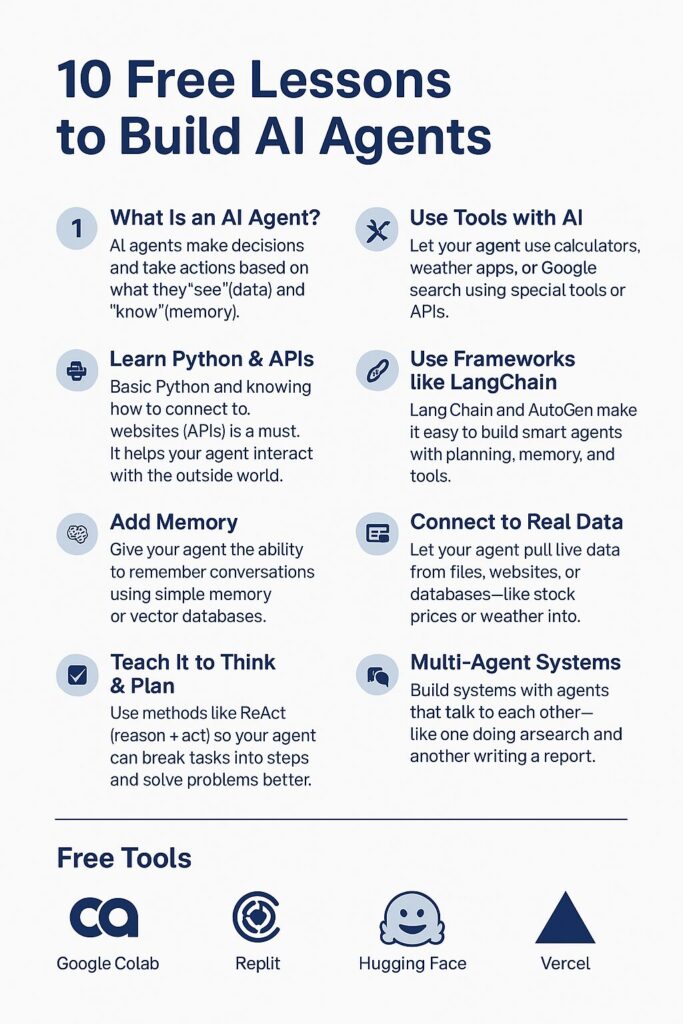
1. What Is an AI Agent?
AI agents make decisions and take actions based on what they “see” (data) and “know” (memory). They can talk, search, plan, and more.
2. Learn Python & APIs
Basic Python and knowing how to connect to websites (APIs) is a must. It helps your agent interact with the outside world.
3. Prompt Engineering
Prompts are how you tell the AI what to do. Good prompts = smart results. Learn how to write them properly.
4. Use Tools with AI (Function Calling)
Let your agent use calculators, weather apps, or Google search using special tools or APIs.
5. Add Memory
Give your agent the ability to remember conversations using simple memory or vector databases.
6. Use Frameworks like LangChain
LangChain and AutoGen make it easy to build smart agents with planning, memory, and tools.
7. Teach It to Think & Plan
Use methods like ReAct (reason + act) so your agent can break tasks into steps and solve problems better.
8. Connect to Real Data
Let your agent pull live data from files, websites, or databases—like stock prices or weather info.
9. Make Multiple Agents Work Together
Build systems with agents that talk to each other—like one doing research and another writing a report.
10. Put It Online
Deploy your agent using Gradio, Streamlit, or FastAPI so others can use it on a website.
🎁 Bonus Tools (Free!): 10 Free Lessons to How to Build AI Agents (Step-by-Step Guide)
- Google Colab – Free coding in the cloud.
- Hugging Face – Host agents & models online.
- Replit / Vercel – Deploy and share your agents easily.
Most Searched Prompts of 2025: Understanding Why and How They Help